
C4 Model Levels Explained: Context, Container, Component & Code (2026)
The C4 model organizes software architecture documentation into four distinct levels of abstraction. Each level answers different questions, targets a different audience, and reveals a different layer of detail. Whether you are onboarding a new stakeholder or guiding a senior engineer through an implementation decision, the right C4 level keeps the conversation focused and productive.
This page is part of our comprehensive guide on C4 Model Architecture. For an even broader introduction, see our complete C4 model guide, which covers the full history, philosophy, and tooling ecosystem behind the notation.
The Four Levels at a Glance
The C4 model hierarchy moves from the broadest possible view of a system down to its implementation details. Think of it like Google Maps: you can view an entire country, then zoom into a city, then a neighborhood, then a specific building. Each zoom level is useful for a different task, and none of them is inherently "better" than another.
The four levels are:
- System Context - Where does this system live in the world?
- Containers - What are the major deployable parts?
- Components - How is each container structured internally?
- Code - How does the code implement each component?
Comparison Table: All Four C4 Model Levels
| Level | Purpose | Primary Audience | Key Questions Answered | Typical Elements | Depth | |---|---|---|---|---|---| | 1 - System Context | Show the system and everything it interacts with | Executives, product owners, non-technical stakeholders | What does this system do? Who uses it? What does it depend on? | People (users/actors), your system (one box), external systems | Lowest - one diagram fits one page | | 2 - Container | Show the high-level technical building blocks | Architects, senior developers, DevOps | What are the major deployable units? How do they communicate? | Web apps, mobile apps, APIs, databases, message queues, file stores | Medium - one diagram per software system | | 3 - Component | Show the internal structure of a single container | Developers working on that container | What responsibilities exist inside this container? How do they collaborate? | Controllers, services, repositories, facades, gateways | High - one diagram per container | | 4 - Code | Show the implementation of a single component | Developers implementing or reviewing the component | What classes, interfaces, or functions make up this component? | UML classes, interfaces, enums, functions, data structures | Highest - often auto-generated from code |
Detailed Overview of Each Level
Level 1: System Context Diagram
The System Context level provides a bird's-eye view of your software system and its relationships with the outside world. It deliberately omits all technology details so that any reader — regardless of technical background — can understand the system's purpose and boundaries.
A system context diagram contains three things: the software system you are describing (as a single box), the people or user groups who interact with it, and the external systems it integrates with. This level answers the question "what does this system do and who cares about it?" before any implementation detail is introduced. It is typically the first diagram you create and the one you share most widely with business stakeholders.
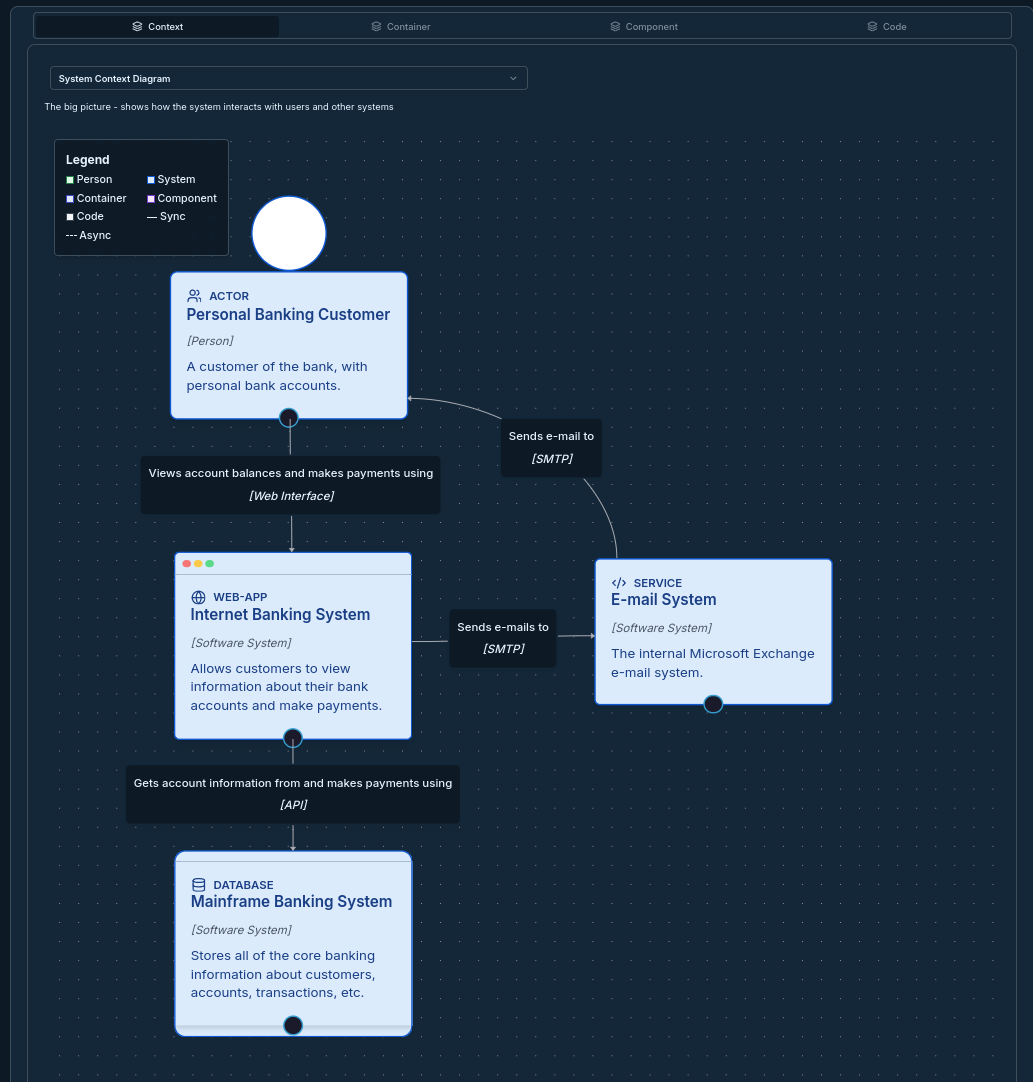
For a deep dive into this level, including how to draw boundaries and label relationships accurately, read our C4 Context Diagram Guide.
Level 2: Container Diagram
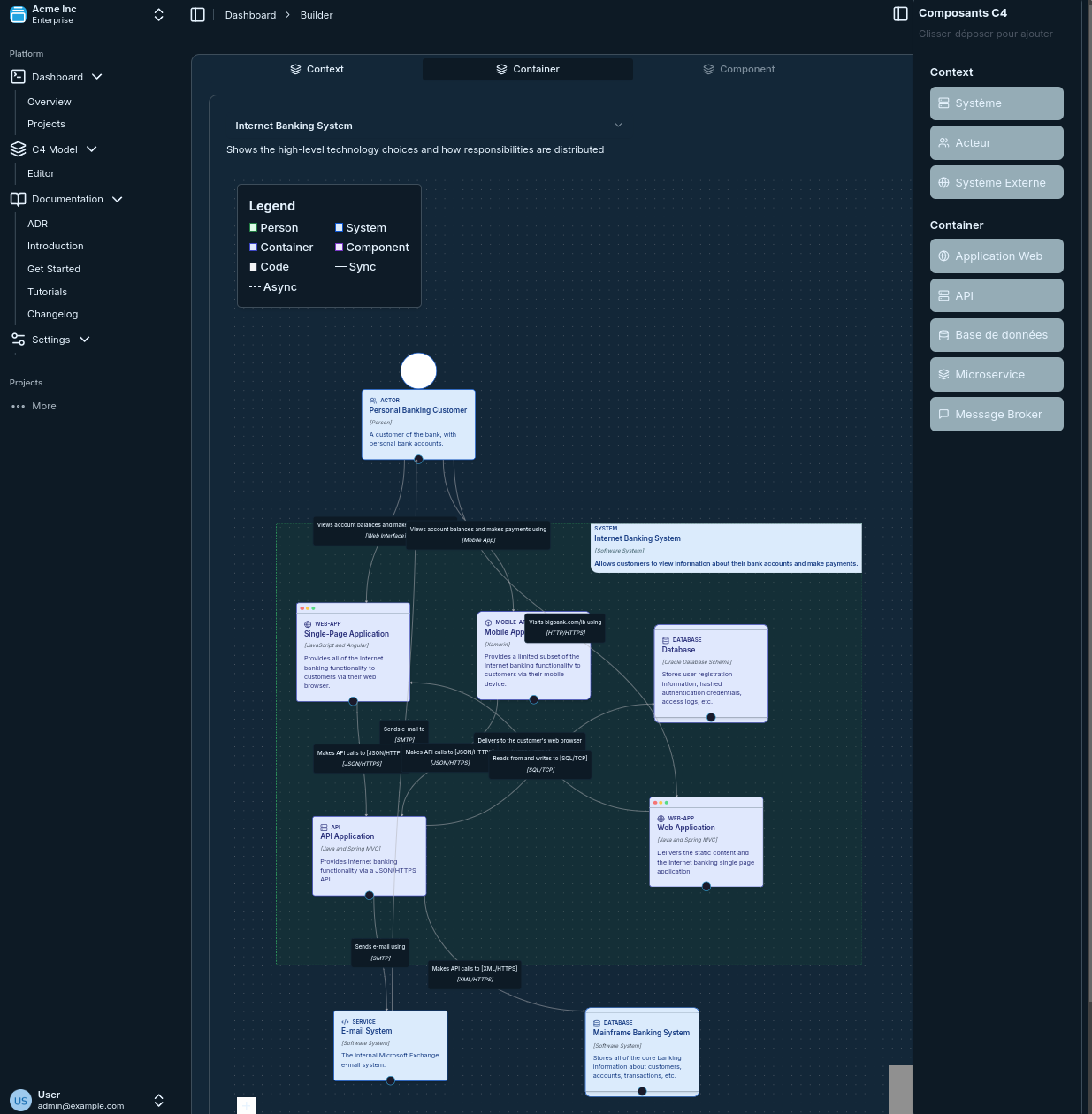
The Container level zooms into your software system to reveal the major deployable or runnable units — the "containers" — and the connections between them. In C4 terminology, a container is not a Docker container specifically; it is any separately deployable unit such as a web application, a mobile app, a REST API, a database, a message broker, or a background job.
This level answers the structural question "how is the system broken up technically, and how do the pieces communicate?" It is the most universally useful level because it maps directly to deployment architecture, making it valuable for architects, senior developers, and DevOps engineers alike. Each container should carry a label describing its technology choice (e.g., "React SPA", "Spring Boot API", "PostgreSQL 15"), because that context shapes every implementation decision downstream.
Level 3: Component Diagram
The Component level zooms into a single container to show the major logical building blocks — the components — and their interactions. A component in C4 terms is a grouping of related code that lives behind a well-defined interface: a controller, a service layer, a repository, an authentication gateway, or a payment facade are all good examples.
This level is primarily useful during detailed design or when onboarding developers onto an existing codebase. It answers the question "how is this container structured, and who is responsible for what?" Importantly, you do not need a component diagram for every container — create one only when the internal complexity warrants it, or when a team needs to align on responsibilities before writing code.
Level 4: Code Diagram
The Code level provides the most granular view, typically represented as UML class diagrams, entity-relationship diagrams, or similar notation. It shows how individual components are implemented in terms of classes, interfaces, functions, and data structures.
This level is explicitly optional in the C4 model. Simon Brown, the creator of C4, recommends generating these diagrams directly from source code rather than maintaining them by hand, since hand-drawn code diagrams go stale almost immediately. If your IDE or documentation toolchain can auto-generate class diagrams, this level adds genuine value for onboarding and code review. If it requires manual effort to keep current, skip it.
How the Levels Connect: The Zoom-In Metaphor
One of C4's core strengths is that the four levels are explicitly linked through a zoom-in relationship. Every element at a higher level can be "opened up" to reveal the next level of detail.
- A software system at Level 1 zooms into one or more container diagrams at Level 2.
- A container at Level 2 zooms into one or more component diagrams at Level 3.
- A component at Level 3 zooms into a code diagram at Level 4.
This traceability means a stakeholder can start at the context level and follow a path down to implementation detail without ever losing the thread. Visual C4 makes this navigation explicit — you can click through levels directly inside the tool.
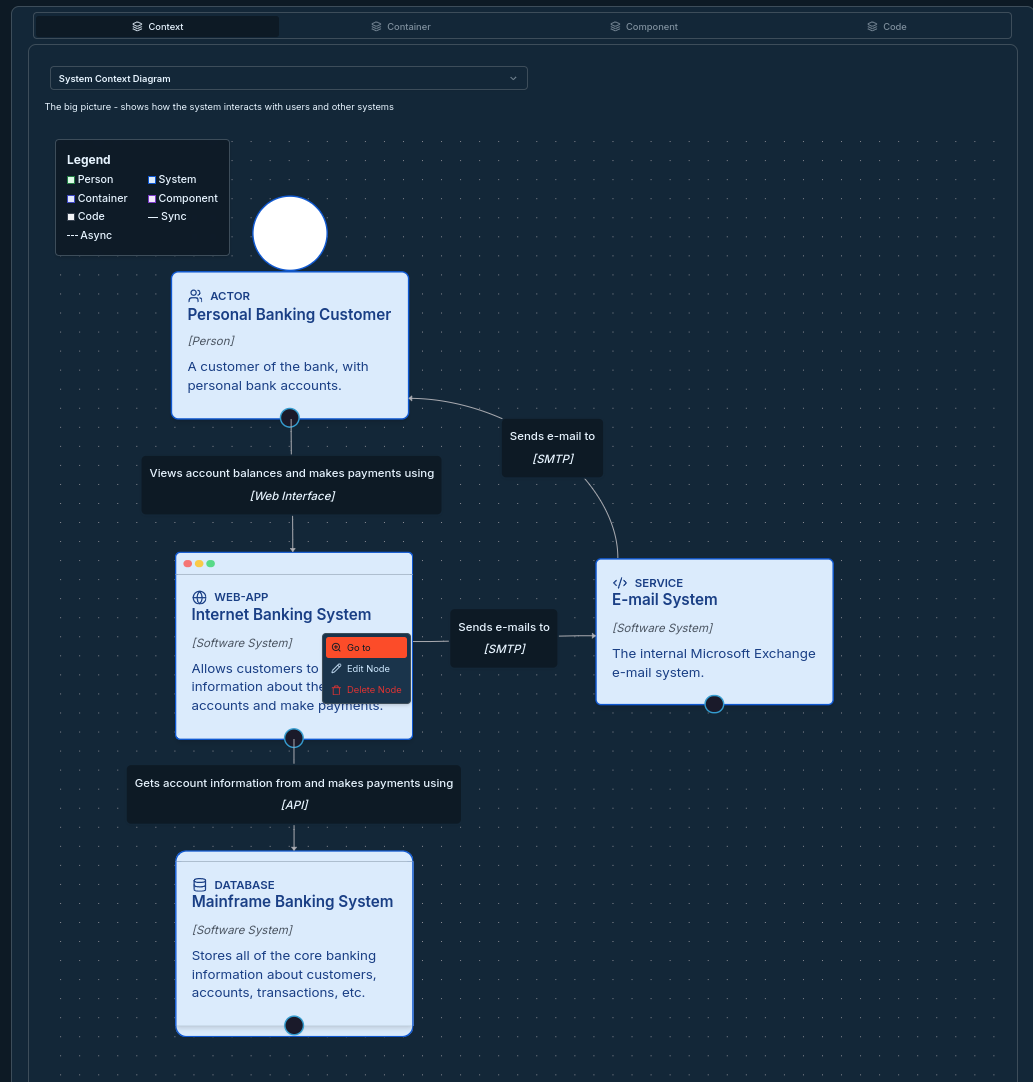
The zoom-in model also enforces consistency. If a container diagram shows a "Payment Service" container, every element inside the corresponding component diagram must belong to that container, not to the broader system. Keeping this discipline prevents diagrams from drifting into mixed-level confusion.
When to Use Each Level
Knowing which level to reach for in a given situation saves significant communication overhead.
Use the System Context diagram when:
- Introducing the system to a new stakeholder, sponsor, or executive
- Scoping a project at the start of discovery
- Documenting integrations for a compliance or security review
- Onboarding a team member who needs to understand the big picture before diving into code
Use the Container diagram when:
- Discussing deployment architecture or cloud infrastructure with DevOps
- Evaluating technology choices (microservices vs. monolith, REST vs. message queue)
- Planning how teams are split across services
- Writing or reviewing an architecture decision record
Use the Component diagram when:
- Designing the internal structure of a new service before development starts
- Helping a developer understand an unfamiliar codebase
- Identifying which team or individual owns a specific responsibility
- Spotting tight coupling or circular dependencies at design time
Use the Code diagram when:
- Auto-generating documentation from source as part of a CI pipeline
- Performing detailed code review sessions on complex domain logic
- Documenting legacy systems where no other design documentation exists
For a step-by-step walkthrough of building diagrams at each level, see our C4 Model Tutorial.
Common Mistakes at Each Level
Getting the level boundary wrong is the most common source of confusion in C4 diagrams. Here are the errors teams make most often and how to fix them.
System Context Mistakes
❌ Showing technology at the context level. Labeling your central box "Node.js API + React SPA" defeats the purpose of the context level. The reader does not need that detail yet.
✅ Name the system by what it does, not how it is built: "Online Banking System" or "Logistics Platform."
❌ Omitting actors. A diagram showing only systems with no humans is incomplete — it fails to explain who initiates workflows.
✅ Always include at least one user persona or actor so the diagram answers "who uses this?"
Container Diagram Mistakes
❌ Showing internal code classes as containers. A UserService class is not a container. A container must be independently deployable.
✅ Ask: "can this be deployed and run on its own?" If not, it is a component, not a container.
❌ Forgetting databases and message queues. Teams often draw only the application tier and leave out the data stores, making the diagram look simpler than reality.
✅ Include every deployable unit: databases, caches (Redis), file storage (S3), message brokers (Kafka), and third-party SaaS boxes that your containers talk to.
Component Diagram Mistakes
❌ Drawing components for trivial containers. A simple CRUD microservice with three classes does not need a component diagram — it adds noise without insight.
✅ Create component diagrams only when a container has meaningful internal complexity that a developer could not infer from the code in under 10 minutes.
❌ Mixing levels within one diagram. Adding a database (a container) inside a component diagram breaks the zoom-in contract and confuses readers.
✅ Keep each diagram at exactly one level. Reference external elements with clear labels like "uses [Database Container]" rather than embedding them.
Code Diagram Mistakes
❌ Maintaining code diagrams by hand. These diagrams become outdated within days of a refactor.
✅ Auto-generate code diagrams from your IDE (IntelliJ, VS Code with PlantUML) or from Structurizr DSL's !include directive. Treat them as a build artifact, not a design artifact.
C4 Model Levels vs. Other Arch Diagram Levels
The four C4 levels map loosely to patterns you may recognize from other methodologies, but with important differences.
The C4 model differs from the classic 4+1 architectural views (Kruchten) in that C4 focuses on a strict zoom hierarchy rather than separate analytical viewpoints. It differs from UML deployment diagrams in that it is notation-agnostic — you can draw C4 diagrams with boxes and arrows in any tool. If you are comparing C4 against UML more broadly, see C4 Model vs UML for a side-by-side analysis.
The four-level hierarchy is also the key feature that makes C4 scalable. Large organizations sometimes extend the model with a fifth "landscape" level (a System Landscape diagram) that shows multiple software systems side by side. This is a pragmatic extension that preserves the zoom-in principle while addressing enterprise-scale documentation needs.
Master Each Level
Once you understand the theory, practice makes the difference. These resources will take you further:
- Context Level deep dive: C4 Context Diagram Guide — system boundaries, actors, and relationship labels
- Real-world examples: C4 Model Examples — see all four levels applied to the same system
- Step-by-step tutorial: C4 Model Tutorial — build your first complete set of diagrams
C4 vs Alternatives
If you are evaluating whether C4's four-level structure is right for your team:
- C4 Model vs UML — when the extra formality of UML pays off
- Comprehensive C4 Architecture Guide — the full philosophy and methodology
Integration and Tools
The right tooling makes working across all four levels dramatically faster:
- Open Source C4 Tools — a curated list of tools that support the C4 hierarchy
- C4 Model Tools Comparison 2026 — an up-to-date comparison of Visual C4, Structurizr, and alternatives
- Architecture Decision Records — link ADRs directly to containers and components in your diagrams
- Best Practices for C4 Diagrams — formatting, naming conventions, and review workflows
Conclusion
The C4 model's four levels — System Context, Container, Component, and Code — form a coherent hierarchy that scales from executive presentations down to implementation detail. The key insight is that no single level is sufficient on its own. Context diagrams align stakeholders on scope; container diagrams align architects on structure; component diagrams align developers on design; code diagrams (when auto-generated) align reviewers on implementation.
The most common mistake teams make is treating C4 as an all-or-nothing documentation exercise. In practice, Level 1 and Level 2 diagrams are almost always worth creating and maintaining. Level 3 diagrams are useful for complex containers. Level 4 should only exist if your toolchain generates them automatically. Start simple, keep the diagrams current, and let the zoom-in structure do the work of routing each conversation to the right level of detail.
For a complete walkthrough of every concept, tool, and best practice in the C4 ecosystem, visit our ultimate C4 model guide.